
A Smarter, Saner Way to Fix WordPress Image Performance
Let’s be honest. Most WordPress sites are dragging around oversized images like they’re trying to prove something.
A 5MB photo gets uploaded… then displayed at 600px… and somehow we all pretend that’s fine.
It’s not.
Search engines notice. Users notice. And your hosting server is quietly suffering. So we built something better.
What Is the Nerd Herd Image Optimizer?
Nerd Herd Image Optimizer is a WordPress plugin designed to fix one of the most common — and most ignored — performance problems on the web: image bloat.
It doesn’t rely on external APIs.
It doesn’t throttle you with limits.
It doesn’t mysteriously stop working halfway through.
It just works — locally, intelligently, and safely.
What It Actually Does
This plugin isn’t trying to impress you with buzzwords. It’s trying to fix your site.
It will:
- Resize oversized images to a sensible maximum (2560px)
- Strip unnecessary metadata (because nobody needs camera data on your homepage)
- Preserve orientation so images don’t rotate like they’ve lost direction in life
- Recompress images intelligently
- Generate modern WebP versions for faster delivery
- Optimize all WordPress image sizes — not just the original
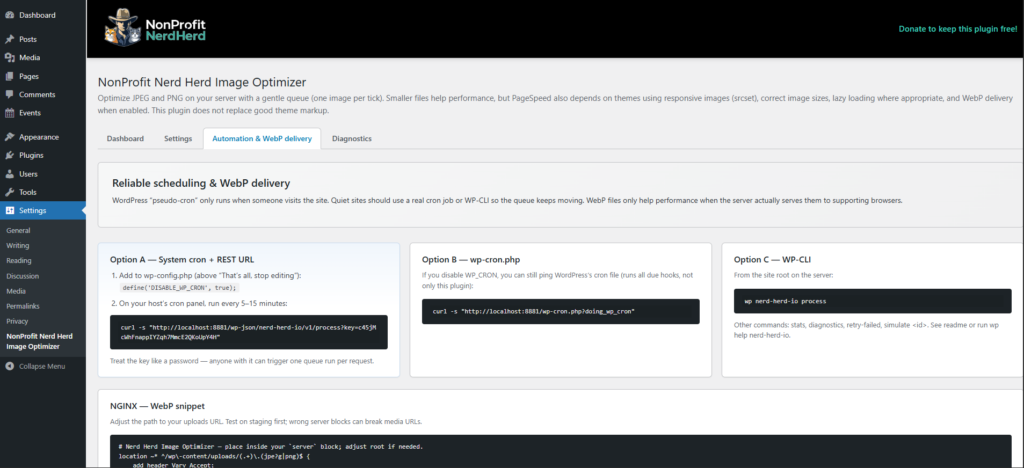
- Process images in the background, one at a time
And it tracks everything:
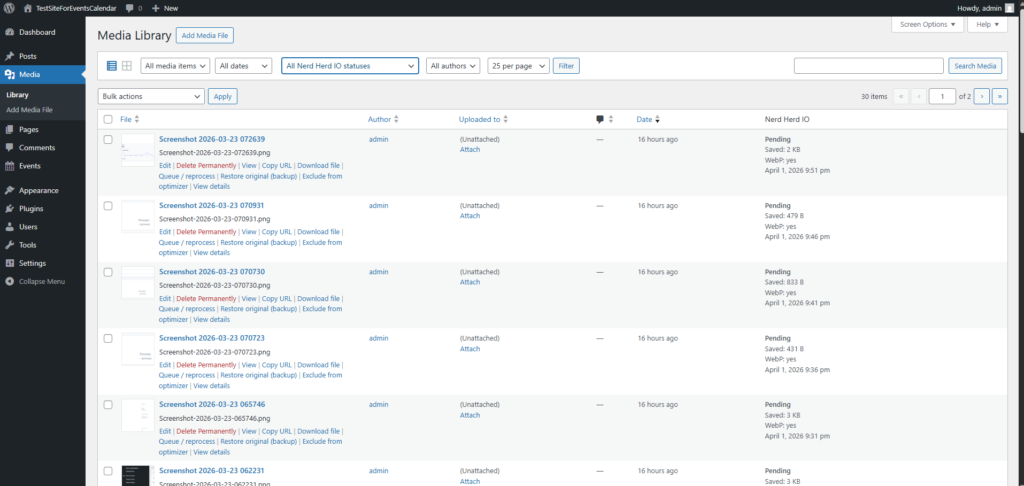
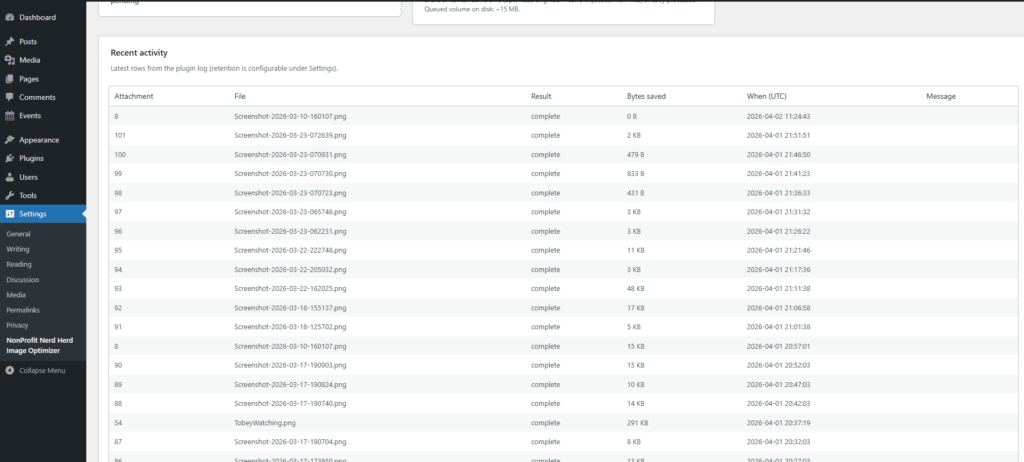
- bytes saved
- optimization status
- compression method used
Because “it probably worked” isn’t good enough.
Built for Real-World Hosting (Not Fantasy Infrastructure)
Most image optimization plugins solve the problem by doing one thing: They send your images somewhere else. Off to their servers. Through their API. On their terms.
Why?
Because image optimization is:
- CPU-heavy
- memory-intensive
- and hard on cheap hosting
So those tools say:
“Let us handle it — just send your images to us.”
And in return, you get:
- API keys
- usage limits
- monthly subscriptions
- and sometimes, unexplained failures
We Took a Different Approach
Instead of offloading your images to another service, Nerd Herd Image Optimizer uses the server you’re already paying for.
But — and this is important — it does it without overwhelming it.
You control:
- how often it runs
- how much work it does
- how aggressively it processes images
By default:
It processes one image at a time, on a controlled schedule (as low as every 5 minutes)
So instead of:
- hammering your CPU
- running massive batch jobs
- or crashing your site
…it spreads the work out into small, manageable steps.
Why That Matters
You’re not adding:
- another service
- another dependency
- another monthly bill
You’re simply using:
the infrastructure you already have — intelligently
It’s the difference between:
- doing everything all at once
- and doing it properly, over time
What Other Optimizers Actually Give You
To be fair, external optimization services do provide value. When you send images to them, you’re getting:
Dedicated processing power
- Dedicated Processing Power – Their servers are built to handle heavy image workloads instantly.
- Advanced compression pipelines – They often use highly tuned encoders and multi-pass optimization.
- Scalability – They can process thousands of images without breaking a sweat.
- Consistency -Everything runs in a controlled environment.
So Why Not Just Use That?
Because that model comes with trade-offs:
- ongoing cost
- API limits
- dependency on external systems
- data leaving your server
- and plugins that quietly stop working when limits are hit
Our Philosophy
We’re not trying to out-muscle those systems. We’re doing something different.
Instead of outsourcing the problem, we solve it locally — carefully, predictably, and within your server’s limits.
Smarter Compression, Not Just a Single Setting
Not all images behave the same way. So the plugin gives you control:
Straight Mode
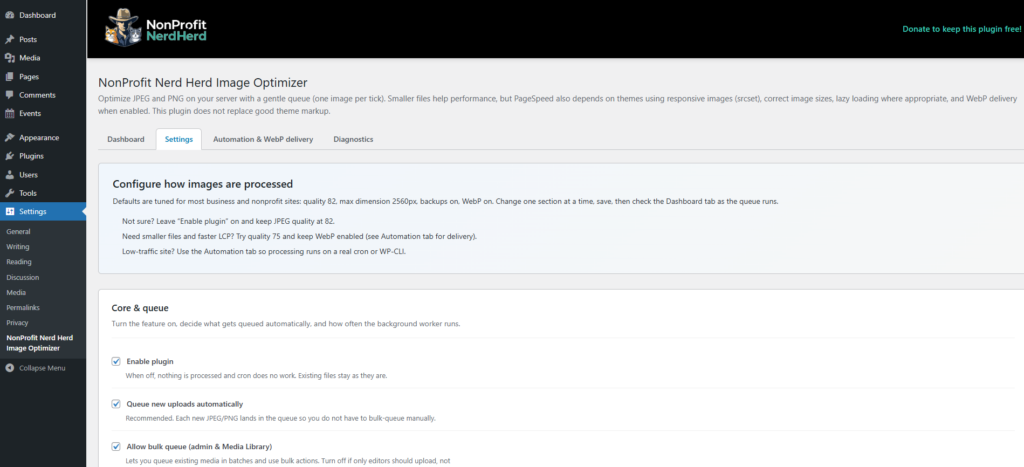
- Fixed quality (82 for balance, 75 for performance)
Adaptive Mode
- Balanced
- Performance
- Max Compression
It adjusts compression intelligently to find the best result without wrecking image quality.
Built-In Safeguards (Because We’ve Seen Things)
This isn’t a “set it and hope” tool.
It includes:
- Backup of original images
- Restore / rollback support
- Automatic rollback for excluded files
- Queue health monitoring and stuck-job detection
- Detailed logging and diagnostics
- File exclusion controls
- Dry-run mode for testing
Because optimization without safety is just destruction with better branding.
Designed for the Way Websites Actually Work
This plugin understands something most tools ignore: You’re not running a lab environment.
You’re running a real website with:
- limited resources
- real users
- and zero tolerance for downtime
So instead of pushing everything at once, it:
- queues the work
- processes gradually
- avoids reprocessing completed items
- and stays out of your way
Why We’re Giving It Away for Free
At NonProfit Nerd Herd, we work with organizations that:
- don’t have unlimited budgets
- don’t have full-time dev teams
- but still need fast, reliable websites
And we’ve seen too many nonprofits stuck with:
- pay-per-image tools
- unreliable plugins
- or systems that stop working when limits are hit
So we built something better.
And we’re releasing it for free because:
A fast website shouldn’t depend on a subscription.
What This Plugin Won’t Do
Let’s keep this honest.
It will not:
- fix a poorly built theme
- rewrite your page builder
- magically solve every PageSpeed issue
If your theme insists on loading full-size images everywhere, that’s still your theme’s problem.
But what this plugin will do is:
make sure every image it touches is as efficient as it can possibly be.
Who This Is For
- Nonprofits trying to improve performance without increasing costs
- Developers who want control without external dependencies
- Site owners tired of unreliable optimization tools
- Anyone who prefers systems that behave predictably
Final Thought
Most tools in this space either:
- oversimplify the problem
- or overcomplicate the solution
This plugin does neither.
It takes a simple position:
Optimize images properly, safely, and consistently — without breaking your site or your budget.
If your site has ever been slowed down by oversized images — which is to say, if your site exists — this is for you.
Welcome to image optimization that actually makes sense.
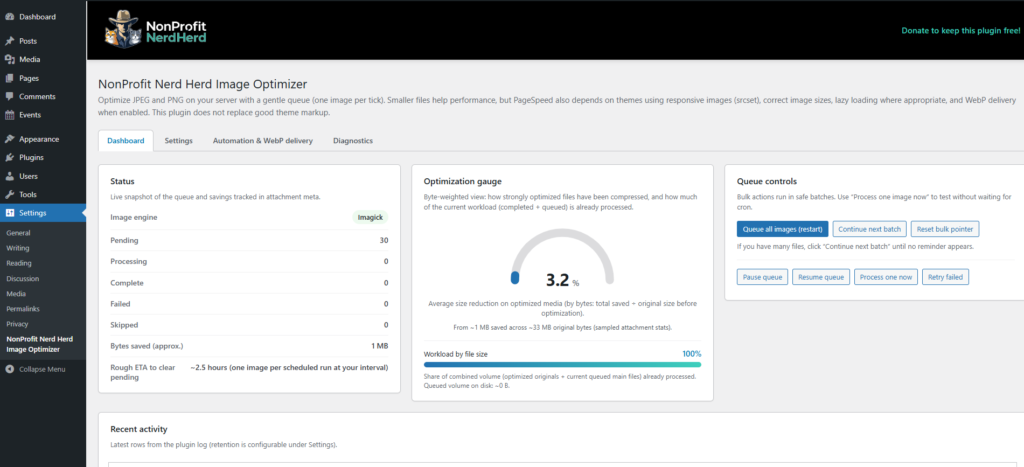
Changelog
Current stable version: 1.1.0 (WordPress 5.8+, PHP 7.4+)
1.1.0
Compression & quality
- Straight mode: fixed JPEG quality (presets 82 / 75 or custom 60–95).
- Adaptive mode: Balanced, Performance, or Max presets; target savings % and minimum quality floor; chosen quality stored in attachment stats and logs.
PNG handling
- Preserve PNG and generate WebP, skip PNG optimization entirely, or convert non-transparent PNGs to JPEG (transparency is always respected when present).
Safety, exclusions, and rollback
- Restore originals from backup (Media Library row actions and attachment screen).
- Excluded filenames (basename, one per line); adding a match can auto-restore already-optimized items when a backup exists, then mark them excluded.
- Per-image exclude / clear exclusion from the Media Library.
Queue & reliability
- Configurable stale processing lock timeout; stuck-job handling and admin notice.
- Diagnostics tab: Imagick/GD, WebP encoding, uploads writable, PHP limits, WP-Cron, next/last queue run, lock status, Apache/NGINX hints, WebP delivery diagnostics (.htaccess marker, samples, guidance).
Dry run & CLI
- Global dry run pauses automatic queue processing.
- WP-CLI:
process,queue-bulk,retry-failed,stats,diagnostics,simulate <attachment_id>(estimate on a temp copy, logged only).
Behavior change
- Removed skipping optimization based on a minimum bytes saved threshold — queued items still complete a full optimization pass when processed.
Admin & UX (current build)
- Dashboard optimization gauge: byte-weighted average savings on optimized media and a workload bar (by file size for completed vs queued mains).
- Wider settings page layout using more of the admin content area.
- Plugins screen: plugin name/branding, author/Plugin URI, Settings link next to Deactivate.
- Media → Library (list): filters for Nerd Herd IO status and author; optional 25 / 50 / 100 / 250 rows per page.
- Header logo and donate links default to your product announcement page (overridable via filters).
Guidance
- In-admin notes on PageSpeed, themes, responsive images, lazy loading, and WebP delivery.
1.0.2
- Admin header layout and full-width treatment in the content area; reliable logo URL; bundled SVG/PNG logo assets.
1.0.1
- NonProfit NerdHerd branded header bar with optional donate link (filterable URLs/text).
1.0.0
- Initial public release: local JPEG/PNG optimization, queue, cron-style pacing, WebP generation, Media Library integration, logging, and core settings.
Click on the link below to start the registration, and download process.